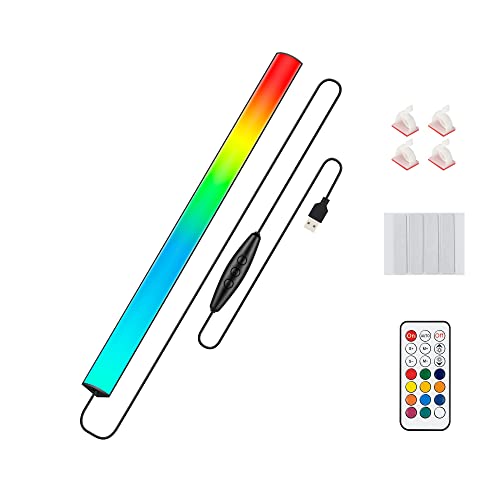
The Quntis Curved Monitor Light Bar is the best overall pick for a gaming desk: it hangs over the top edge of a 34-inch or larger curved screen, pairs a front task light with a rear RGB backlight, and adds a remote, so one device covers desk lighting and screen glow. Players with a flat 24-inch to 27-inch screen can choose one of the Samphon bars for a simpler, white-light setup. A monitor light bar is a slim USB-powered lamp that sits on top of the screen and shines down onto the desk, and a good one aims its beam away from the display so it does not wash out the picture.
Our Top Picks
 Quntis Curved Monitor Light Bar 15 RGB BacklightIM 26 inch17.3 x 5.5 x 4 inches2.7 PoundsCheck on Amazon

Top 3 picks at a glance
Quick List
- Under Monitor RGB Light Bar (12 inch) – best for an RGB accent glow under the screen and over the keyboard
- Samphon 11.8 inch Monitor Light Bar – best for a compact white-light desk lamp on a standard monitor
- Quntis Curved Monitor Light Bar – best for 34-inch and larger curved gaming monitors
- SAMPHON 15.7 inch Ultrawide Light Bar – best for wider flat ultrawide and larger monitors
- SAMPHON RGB Dual Light Bar – best for a white front light with a rear RGB backlight on a mid-size screen
- RGB Music Sync Light Bar – best as a runner-up for ambient color and TV or monitor backlighting, not task lighting
Which One Is Right for You?
| If you… | Choose |
|---|---|
| Use a curved ultrawide of 34 inches or more | Quntis Curved Monitor Light Bar |
| Want RGB glow behind the screen and a white light for the desk | SAMPHON RGB Dual Light Bar or Quntis Curved |
| Need a plain, dimmable white light for a 24-inch to 27-inch monitor | Samphon 11.8 inch Monitor Light Bar |
| Have a wide flat monitor and want more reach along the top edge | SAMPHON 15.7 inch Ultrawide Light Bar |
| Care most about color effects and music sync, not reading light | RGB Music Sync Light Bar (runner-up) |
| Want an accent strip that glows under the monitor above your keyboard | Under Monitor RGB Light Bar |
The most important question is whether you want a task light that illuminates the desk or an effects light that colors the wall. A true task bar has an angled beam and a cutoff above the screen. An effects strip shines in every direction and is better for atmosphere. Many gaming desks use one of each.
A few practical limits apply to every bar here. They all draw power over USB, so you need a free port or adapter near the monitor, and none of them replaces a room light for general illumination. Mount type and monitor thickness also decide whether a bar sits securely, so check the clearance behind your screen. If you plan to run RGB effects late at night, set the brightness low and keep the front light warm.
All 6 Picks in Detail
1. Under Monitor RGB Light Bar, 12 Inch – Best for an RGB Accent Under the Screen
As an Amazon Associate we earn from qualifying purchases at no extra cost to you.

This 12-inch bar is built to glow rather than to light a desk for reading. The listing describes a USB-powered, 5V LED bar for gaming setups, with 353 color-change modes and a wireless remote, and it also calls it a keyboard light. That points to an under-monitor or keyboard-edge position, where it adds RGB color to the desk and the wall behind the keyboard. It suits someone who wants a visual accent that matches an RGB keyboard and PC case. It is not a replacement for a lamp that lights papers or a mechanical keyboard in the dark, and the listing does not state brightness in lumens.
- Length: 12 inches
- Power: USB, 5V
- Effects: 353 color-change modes, per the listing
- Control: wireless remote
- Use: under-monitor and keyboard accent lighting
- Brightness, mounting method and cable length: confirm on listing
Pros:
- Many color effects for RGB-themed desks
- Low-voltage USB power and a simple remote
Cons:
- Not designed as a dedicated reading or task light
- Brightness and mounting details are not stated in the listing name
Next to the Quntis, which also has an RGB backlight, this one is the simpler accent-only option because it does not include a front white task light.
2. Samphon 11.8 Inch Monitor Light Bar – Best for a Compact White-Light Desk Lamp

The Samphon 11.8-inch bar is the plain, practical choice. The listing calls it a USB-powered, eye-care reading monitor lamp with ultrawide lighting, three color temperatures and dimming. It suits a 24-inch to 27-inch monitor on a regular desk where you want a clean white light on the keyboard and desk without any RGB effects. A shorter bar like this covers less width, so it may leave the corners dim on a very wide monitor, where one of the longer bars is the better match.
- Length: 11.8 inches
- Power: USB
- Color temperatures: three, per the listing
- Dimming: dimmable
- Marketing: eye-care reading lamp
- Mount type and brightness figures: confirm on listing
Pros:
- Simple white light with three color temperatures
- Compact size suits ordinary monitors
Cons:
- No RGB effects or backlight
- Limited reach on very wide screens
It is the shorter sibling of the 15.7-inch SAMPHON bar, so pick it for a standard monitor and the longer model for a wide one.
3. Quntis Curved Monitor Light Bar – Best for 34-Inch and Larger Curved Monitors

This is the pick for a curved ultrawide. The listing describes a 15-mode RGB backlight, a foldable dual-light design with color temperature and brightness control, and a fit for 34-inch and larger screens. Quntis lists a 66 cm (26-inch) bar that hangs over the top edge of the monitor with no desk clamp or adhesive, using a front white light and an independent rear RGB backlight. Quntis also describes 45-degree asymmetric lighting. Curve fit depends on how tight the monitor’s curve is, so check the stated curvature range on the product page against your screen.
- Designed for: 34-inch and larger curved screens
- Design: foldable dual light, per the listing
- Backlight: 15 RGB modes, per the listing
- Front light: adjustable color temperature and brightness
- Length: about 26 inches, per Quntis
- Control: wireless remote, per Quntis
Pros:
- Task light and RGB backlight in one bar
- Made to follow a curved screen, with no clamp
Cons:
- Large and may not suit flat or small monitors
- Fit depends on the monitor’s curve and thickness
It is the opposite of the Under Monitor RGB bar: this one adds proper desk lighting, while the other is an accent only.
4. SAMPHON 15.7 Inch Monitor Light Bar – Best for Wide Flat Monitors

The 15.7-inch SAMPHON bar is the longer white-light option. The listing names a USB eye-care monitor lamp for home office and gaming use, with ultrawide LED lighting, three color temperatures and stepless dimming. That makes it a fit for a 27-inch to 34-inch flat monitor and for desks where you want even light across a wider area. It does not include RGB effects, so it works best on a setup that already has its own ambient lighting.
- Length: 15.7 inches
- Power: USB
- Color temperatures: three
- Dimming: stepless
- Marketing: eye-care, home office and gaming use
- Mounting, brightness and curved-screen fit: confirm on listing
Pros:
- Longer bar covers more of the desk
- Stepless dimming for fine brightness control
Cons:
- No RGB lighting
- Curved-screen compatibility is not stated in the listing name
Versus the Quntis, this bar is the plain-white alternative for flat monitors; the Quntis adds color effects and a curve-matching design.
5. SAMPHON RGB Monitor Light Bar – Best for a Dual Light With RGB Backlight

This SAMPHON model is the dual-purpose option for mid-size screens. The listing describes an eye-care dual light with a reading frontlight and a gaming RGB backlight with nine modes, and the frontlight offers three colors with dimming. It suits a gamer who wants a bit of glow behind a monitor along with a white light on the desk. The listing name does not state its length, so check the product page to see whether it fits your monitor’s width.
- Design: dual light, frontlight plus RGB backlight
- Backlight effects: nine modes
- Frontlight: three colors, dimmable
- Power: USB
- Marketing: eye-care, gaming backlight
- Length and mount type: confirm on listing
Pros:
- Task light and RGB backlight together
- Simple set of modes, easy to manage
Cons:
- Fewer effects than the Quntis
- Length is not stated in the listing name
It is the smaller-screen counterpart to the Quntis Curved bar, with the same dual-light idea in a simpler package.
6. RGB Light Bar, Music Sync – Best as a Runner-Up for Ambient and TV Backlighting

We list this one as a runner-up because its listing calls it an ambient lighting bar and a gaming or TV backlight, not a monitor task lamp. It is a USB-powered RGB IC LED bar with music sync and a remote control, and it is designed to glow on a wall or behind a display. That makes it a fit for mood lighting, a stream backdrop or bias lighting, not for lighting a keyboard or notes. If you want a light that sits on top of the monitor and shines down onto the desk, choose one of the other five instead.
- Type: RGB ambient lighting bar
- Power: USB
- Control: remote
- Effects: music sync, color changing
- Use: gaming and TV backlight
- Length, brightness and mounting: confirm on listing
Pros:
- Music sync and color-changing effects
- Useful as a backdrop for a stream or a dark room
Cons:
- Not intended as a task or reading light
- Mounting and length details are not stated in the listing name
Compared with the Under Monitor RGB bar, it is aimed at the wall behind the screen, while that one is aimed at the desk in front of it.
Specs Compared
| Light bar | Length | Light type | Color options | Power | Control |
|---|---|---|---|---|---|
| Under Monitor RGB Bar | 12 in | RGB accent | 353 modes | USB 5V | Wireless remote |
| Samphon 11.8 in | 11.8 in | White task light | 3 color temperatures | USB | confirm on listing |
| Quntis Curved | About 26 in (per Quntis) | White front light plus RGB backlight | 15 RGB modes; adjustable color temperature | USB | Wireless remote |
| SAMPHON 15.7 in | 15.7 in | White task light | 3 color temperatures; stepless dimming | USB | confirm on listing |
| SAMPHON RGB Dual | confirm on listing | White frontlight plus RGB backlight | 9 RGB modes; 3 frontlight colors | USB | confirm on listing |
| RGB Music Sync Bar | confirm on listing | RGB ambient bar | Color changing; music sync | USB | Remote |
How We Chose These
We compared the six listed bars using their listing titles, the specification fields on each product page and manufacturer descriptions where we could find them. The criteria were the light type (task light, RGB backlight or both), the length relative to common monitor sizes, whether the listing names color-temperature and dimming control, the power source, the remote or control method, and whether the bar fits curved screens. Where the listing name leaves out a value such as brightness or mounting type, we wrote “confirm on listing” instead of guessing. This is a research-based comparison of published specifications, not a physical evaluation, so read the product page for your monitor’s thickness and curve before ordering.
What to Look For
Task Light, Backlight or Both
Start with what you want the light to do. A task light shines on the desk so you can see the keyboard, notes and controllers. A backlight shines on the wall behind the screen, which many people use for atmosphere or to soften the contrast between a bright display and a dark room. Dual-light bars combine the two with separate controls. If you want only one effect, a single-function bar is simpler; if you want both, look for independent controls so you can switch one off without losing the other.
Asymmetric Optics and Screen Glare
A good task bar angles its beam downward and shields the monitor, so the light reaches the desk but not the glass. Buying guides describe this as asymmetric optics, with a cutoff so the light stops before it reaches the display. A bar that simply points LEDs downward can cause reflections on a glossy screen, which defeats the purpose. A quick check once installed is to look for a clean line where the light stops. Listings that mention a 45-degree angle or anti-glare design are describing this feature.
Color Temperature, Brightness and Color Accuracy
Color temperature runs from warm (about 2700K to 3000K) to cool daylight (about 5000K to 6500K). Warm light feels comfortable at night, and cooler light suits daytime work. Many budget bars offer three fixed steps, while others provide a stepless range. Some manufacturers publish a color rendering index (CRI), with 90 or higher being the usual mark of accurate colors; Quntis, for example, describes Ra98 for its curved bar. Brightness figures vary and are often given in lux at a stated distance, so compare them only when the distance is the same. As a rule of thumb, aim for a light level that makes the desk bright enough to read without making the screen look dim by comparison.
Power, Safety and USB Ports
Monitor light bars typically run on 5V USB power, and most draw only a few watts. That is low voltage, but it is still good to plug into a port that can supply the current, such as a wall adapter, a powered hub or a monitor’s USB port, particularly for longer bars with many LEDs. Check that the cable and connector are not pinched behind the monitor, and do not cover the bar while it is on. Avoid adhesive pads on hot or textured surfaces and do not look directly into the LEDs at high brightness. People who are sensitive to flashing lights should avoid fast strobe or music-sync modes.
Mounting: Clip, Counterweight, Clamp or Adhesive
Mounts vary. Counterweight and over-the-top designs rest on the monitor’s upper edge with no tools. Clamp styles attach to the desk or a bezel. Adhesive strips stick under or behind a screen. Check the monitor’s thickness, bezel and curve against the listing, since thin curved screens and bezel-less designs need a flexible mount. Also confirm where the cable exits, because a USB cable that reaches the port neatly makes the setup far tidier.
Setting Up a Gaming Desk With Two Light Layers
The most comfortable gaming desks use two layers of light rather than one. The first layer is a task light, such as a monitor bar, that keeps the keyboard, mouse and desk surface visible at a modest brightness. The second layer is bias or ambient light behind the screen, which makes the room around the display less dark than the picture itself. Keep both layers dimmer than the screen’s brightest content, and set the color of the backlight to a neutral white or a soft color so it does not distract from the game. If you also stream or record, check your camera’s view: a bright bar near the top of the frame can blow out the image, so angle it down and test a short clip before going live.
Cable Length, USB Ports and Cable Management
USB-powered bars need a port within reach. Most monitor USB hubs, PC front panels and wall adapters work, but many monitors only supply a small amount of current from their hub ports, so a long bar with a remote and RGB controller may behave better from a dedicated port. Look for a cable that runs down the back of the monitor stand without excess slack, and use a small adhesive clip or a velcro strap to keep it from dangling. If the cable is too short, a USB extension cord is a simple fix, though very long or thin extensions can drop voltage and make LEDs flicker or dim at maximum brightness.
When a Light Bar Is Not the Right Tool
A monitor bar is not always the best answer. If your monitor has a very thin bezel or a frameless design, the bar may not sit securely without a special mount, and a clamp-on desk lamp can be easier. If the room is already brightly lit, a bar adds little. And if you only want color, an RGB wall strip is simpler. In those cases, consider the runner-up styles in this guide instead of forcing a bar to do a job it was not built for.
Worked Example
Suppose you have a 34-inch curved gaming monitor that is about 32 inches wide and sits on a desk with an RGB keyboard. A 26-inch bar spans roughly four-fifths of the width, which gives even light across the keyboard. A 12-inch accent bar would leave the left and right sides dark. Pair a task bar with a separate backlight only if the first bar lacks one. Matching length to the monitor’s width is the simplest rule you can apply.
Questions
Do monitor light bars cause glare on the screen?
A well-designed bar with asymmetric optics aims light at the desk and away from the display. Low-end bars that point LEDs downward can reflect on glossy screens, so check for a clear cutoff after installation.
Will a light bar fit a curved monitor?
Some do, but fit depends on the curve and thickness. The Quntis Curved bar is designed for 34-inch and larger curved screens, while the other listings do not state curved-screen compatibility in their names, so confirm it on the product page.
How are monitor light bars powered?
Most run on 5V USB, usually from the monitor, a PC port or a wall adapter. Check that the port can supply enough current for the bar.
What color temperature should I choose?
Use warmer light in the evening and cooler light during the day. Bars with three steps or stepless adjustment let you change it as the day goes on.
Are RGB modes useful on a light bar?
They are mostly cosmetic. A backlight can add mood or match other RGB gear, but the white light is what helps you see the desk, so judge both separately.
Do I need a remote control?
It is optional. A remote is handy for changing modes from your chair, but touch controls on the bar are enough if you set a single white level and leave it.
Update History
- October 20, 2026 – Initial publication; product set drawn from current catalog listings.
- Check the product page for current specifications and availability before buying.
Sources
- Retailer listing titles and specification fields for each light bar named above
- Quntis product pages and published coverage of the Quntis Curved Monitor Light Bar
- Independent monitor light bar buying guides covering asymmetric optics, USB power, color temperature and color rendering