For most 144Hz gaming setups, the IVANKY 8K DisplayPort 1.4 cable in the 6.6 ft length is the best all-around pick: it is a VESA-certified DP 1.4 cable with the 32.4Gbps HBR3 link rate that 1440p and 4K high-refresh monitors rely on, and it is long enough for a typical desk. Players with a DisplayPort 2.1 monitor should look at the Silkland DP80 cable instead. A DisplayPort cable carries video, and at 144Hz the cable’s rated bandwidth decides whether your monitor reaches its full refresh rate or falls back to a lower one.
Our Top Picks


Top 3 picks at a glance
Quick List
- IVANKY DP 1.2, 6.6 ft – best for 1080p and 1440p monitors that top out near 144Hz
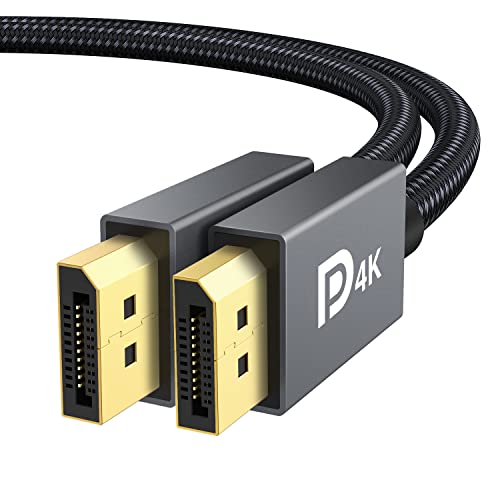
- IVANKY 8K DP 1.4, 6.6 ft – best all-around cable for 144Hz and 240Hz monitors
- Capshi 8K DP 1.4, 10 ft – best for desks where the PC sits far from the screen
- Silkland DP 2.1 DP80, 6.6 ft – best for DisplayPort 2.1 monitors and future upgrades
- Acer 8K DP 1.4, 10 ft braided – best for long, tough runs with FreeSync displays
- Capshi 8K DP 1.4, 6.6 ft – best for a short, certified DP 1.4 run
Which One Is Right for You?
| If you… | Choose |
|---|---|
| Own a DisplayPort 2.1 monitor and want the full link speed | Silkland DP 2.1 DP80, 6.6 ft |
| Want one dependable cable for a 1440p or 4K 144Hz monitor | IVANKY 8K DP 1.4, 6.6 ft |
| Need extra reach between a tower on the floor and a raised monitor | Capshi 8K DP 1.4, 10 ft |
| Prefer a braided jacket and a long cord for a FreeSync screen | Acer 8K DP 1.4, 10 ft |
| Have a compact desk and a short run | Capshi 8K DP 1.4, 6.6 ft |
| Run a 1080p or 1440p monitor that tops out around 144Hz | IVANKY DP 1.2, 6.6 ft |
If your monitor is a 1440p panel at 144Hz or 165Hz, nearly every cable here will work, and the choice becomes length and build. If your monitor is 4K at 144Hz or faster, or uses DisplayPort 2.1, bandwidth class becomes the deciding factor.
One more rule of thumb: match the cable to the weakest link. A DP 2.1 cable does not make a DP 1.4 monitor faster, and a poorly built or uncertified cord can hold back a fast monitor. Start by finding your monitor’s native resolution and top refresh rate in its manual, then check the DisplayPort version listed beside the port. If you are unsure, the DP 1.4 cables in the middle of this list are the safe choice, and the Silkland DP 2.1 cable is the forward-looking one.
All 6 Picks in Detail
1. IVANKY DisplayPort 1.2 Cable, 6.6 ft – Best for 1080p and 1440p 144Hz
As an Amazon Associate we earn from qualifying purchases at no extra cost to you.

This is the oldest-spec cable in the group, and the listing says so plainly: it is a DP to DP cable built to the 1.2 standard and rated for 4K at 60Hz. DisplayPort 1.2 uses the HBR2 link rate, which is 21.6Gbps raw, and that is enough for 1080p at 240Hz or 1440p at 144Hz and above. It suits someone with a mainstream 1080p or 1440p gaming monitor who simply needs a certified cable that reaches the screen. It is the wrong choice for 4K at 120Hz or 144Hz, because that resolution needs the higher bandwidth of DP 1.4.
- Standard: DisplayPort 1.2 (HBR2 class)
- Length: 6.6 ft
- Listed 4K support: 60Hz
- VESA certification stated in the listing name
- Gold-plated connectors, per the listing
- 2K refresh figure is cut off in the catalog entry, so confirm it on the product page
Pros:
- Fine for 1080p and 1440p high refresh rates
- Certified, with a plain and simple feature set
Cons:
- Not meant for 4K above 60Hz
- No headroom for HDR at high refresh on newer monitors
Compared with the IVANKY 8K DP 1.4 cable next in the list, this one gives up 4K high-refresh headroom for no real gain, so choose it only when your monitor is 1440p or lower.
2. IVANKY VESA Certified 8K DisplayPort Cable 1.4, 6.6 ft – Best All-Around for 144Hz and 240Hz

This is the pick most players should start with. The listing names DisplayPort 1.4, VESA certification, HDR support and the HBR3 link rate with 32.4Gbps of bandwidth, plus the resolution claims of 8K at 60Hz, 4K at 240Hz and 2K at 240Hz. Those top-line figures depend on Display Stream Compression and on what your graphics card and monitor both support, so treat them as the cable’s ceiling, not a guarantee. For a 1440p 144Hz or 165Hz monitor, or a 4K 144Hz monitor, it covers the link speed that DP 1.4 provides.
- Standard: DisplayPort 1.4 with HBR3
- Bandwidth: 32.4Gbps raw, per the listing
- Length: 6.6 ft
- VESA certified, per the listing name
- HDR support stated
- Listed resolutions: 8K at 60Hz, 4K at 240Hz, 2K at 240Hz
Pros:
- Certified DP 1.4 spec covers most current gaming monitors
- Length suits most desks without excess slack
Cons:
- The headline refresh figures need DSC support on both ends
- No reach for a floor-standing tower on a tall desk
Against the Capshi 10 ft cable, the IVANKY gives you the same class of spec in a shorter, tidier length; pick the Capshi only if the 6.6 ft run falls short.
3. Capshi 8K 4K DisplayPort Cable 1.4, 10 ft – Best for Long Runs

Capshi’s 10 ft version is for desks where the PC sits on the floor or across the room from the screen. The listing names DP 1.4, VESA certification and the 32.4Gbps high-speed class, with 8K at 60Hz, 4K at 144Hz and 2K at 240Hz as the headline resolutions. The 4K figure is stated at 144Hz here, a more modest claim than some others in the group, and it matches what a DP 1.4 link is designed to carry with compression. At 10 ft, signal quality matters more than at shorter lengths, so a certified cable is the sensible choice.
- Standard: DisplayPort 1.4
- Bandwidth: 32.4Gbps, per the listing
- Length: 10 ft
- VESA certified, per the listing name
- Listed resolutions: 8K at 60Hz, 4K at 144Hz, 2K at 240Hz
- Marketed for gaming monitors and graphics cards
Pros:
- Extra length for tower-under-the-desk layouts
- Certified spec at a length where quality matters
Cons:
- Extra slack needs cable management
- Still a DP 1.4 ceiling, not DP 2.1
It is the same family as the Capshi 6.6 ft cable at the end of this list; choose this one only when you need the additional 3.4 ft.
4. Silkland 80Gbps DisplayPort Cable 2.1, 6.6 ft – Best for DisplayPort 2.1 Monitors
![Silkland 80Gbps DisplayPort Cable 2.1 [VESA Certified] 6.6FT/2M, DP80 HDR | 16K@60Hz, 8K@240Hz, 4K@540Hz 480Hz 360Hz 240Hz, DP 2.1 Cable for](https://m.media-amazon.com/images/I/41ZU3eQbhEL._SL160_.jpg)
The Silkland is the only cable here aimed at DisplayPort 2.1. The listing shows 80Gbps, VESA certification, the DP80 label, and headline modes of 16K at 60Hz, 8K at 240Hz and 4K at 540Hz, 480Hz, 360Hz and 240Hz. DP80 is the VESA certification tier tied to UHBR20 operation, which is 80Gbps raw across four lanes. This cable only matters if both your graphics card and your monitor support DisplayPort 2.1 at the high link rates; with a DP 1.4 device on either end, the link falls back to the slower speed. It is also a reasonable buy for someone planning to upgrade a monitor and card within the next couple of years.
- Standard: DisplayPort 2.1
- Bandwidth: 80Gbps, per the listing
- Length: 2 m (6.6 ft)
- VESA certified, DP80 labeled
- HDR support stated
- Listed modes: 16K at 60Hz, 8K at 240Hz, 4K up to 540Hz
Pros:
- The highest bandwidth class in the group
- Backward compatible with DP 1.4 hardware
Cons:
- No visible benefit unless both devices support DP 2.1
- Few current monitors use the full UHBR20 rate
Compared with the IVANKY 8K DP 1.4 cable, it loses nothing in compatibility but adds value only on newer hardware.
5. Acer 8K DisplayPort Cable, 10 ft – Best for Braided Long Runs With FreeSync
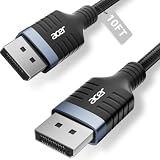
Acer’s cable is a DP 1.4 cord in a 10 ft braided jacket. The listing names 8K at 60Hz, 4K at 240Hz and 144Hz, 32.4Gbps bandwidth and FreeSync support. It suits gamers using an AMD graphics card with a FreeSync monitor, and anyone who wants a sturdier jacket for a cable that gets moved or tucked behind a desk. Unlike the IVANKY and Capshi cables, the listing name we reviewed does not state VESA certification, so confirm that detail on the product page if certification matters to you.
- Standard: DisplayPort 1.4
- Bandwidth: 32.4Gbps, per the listing
- Length: 10 ft
- Braided jacket
- FreeSync support named
- VESA certification not stated in the listing name; confirm on the page
Pros:
- Braided jacket for durability
- Long reach with a DP 1.4 rating
Cons:
- Certification is not stated in the listing name
- Braiding is stiffer to route in tight spaces
It competes directly with the Capshi 10 ft cable, which states certification; choose the Acer for the braid and brand, the Capshi for the certification on paper.
6. Capshi 8K 4K DisplayPort Cable 1.4, 6.6 ft – Best for a Short Certified Run

This is the short sibling of the 10 ft Capshi. The listing names DP 1.4, VESA certification, 32.4Gbps bandwidth, and headline modes of 8K at 60Hz, 4K at 144Hz and 2K at 240Hz. It suits a monitor on a normal desk with the PC close by, where a long cable would only add clutter. The stated 4K 144Hz ceiling is a sensible fit for a 4K high-refresh gaming monitor, and it matches the 1440p 144Hz and 165Hz panels that make up most of the market.
- Standard: DisplayPort 1.4
- Bandwidth: 32.4Gbps, per the listing
- Length: 6.6 ft
- VESA certified, per the listing name
- Listed modes: 8K at 60Hz, 4K at 144Hz, 2K at 240Hz
- Marketed for gaming monitors and graphics cards
Pros:
- Certified and sized for a standard desk
- Conservative, realistic 4K 144Hz claim
Cons:
- Too short for a floor-level tower on some desks
- No DP 2.1 headroom
Next to the IVANKY 8K DP 1.4 cable it is a near-equal; the IVANKY lists higher 4K refresh claims, while this one keeps the figures closer to what DP 1.4 comfortably carries.
Specs Compared
| Cable | DisplayPort version | Length | Stated bandwidth | VESA certified (per listing) | Headline modes |
|---|---|---|---|---|---|
| IVANKY DP 1.2 | 1.2 | 6.6 ft | confirm on listing | Yes | 4K at 60Hz; 2K refresh figure confirm on listing |
| IVANKY 8K DP 1.4 | 1.4 (HBR3) | 6.6 ft | 32.4Gbps | Yes | 8K 60Hz; 4K 240Hz; 2K 240Hz |
| Capshi 8K DP 1.4 (10 ft) | 1.4 | 10 ft | 32.4Gbps | Yes | 8K 60Hz; 4K 144Hz; 2K 240Hz |
| Silkland DP 2.1 DP80 | 2.1 | 6.6 ft (2 m) | 80Gbps | Yes (DP80) | 16K 60Hz; 8K 240Hz; 4K up to 540Hz |
| Acer 8K DP 1.4 | 1.4 | 10 ft | 32.4Gbps | confirm on listing | 8K 60Hz; 4K 240Hz and 144Hz |
| Capshi 8K DP 1.4 (6.6 ft) | 1.4 | 6.6 ft | 32.4Gbps | Yes | 8K 60Hz; 4K 144Hz; 2K 240Hz |
How We Chose These
We compared the six listed cables by reading their listing titles and the specification fields they publish, then checking those claims against the DisplayPort standard itself. The questions we asked were simple. Which DisplayPort version does the cable claim, and does the stated bandwidth match that version? Is VESA certification named? Does the length suit a common desk? Do the headline refresh rates fit what that DisplayPort version can carry? We also noted where a listing name leaves out a detail, such as certification or a refresh figure, and marked it as something to confirm rather than guessing. This is a research-based comparison of published specifications and standards, not a physical evaluation, so always read the product page for the final word on your exact monitor and graphics card.
What to Look For
DisplayPort Version and Bandwidth
The version number tells you the maximum link speed. DisplayPort 1.2 runs at 21.6Gbps raw. DisplayPort 1.4 uses the HBR3 rate of 8.1Gbps per lane across four lanes, which is 32.4Gbps raw and about 25.92Gbps of usable data after encoding overhead. DisplayPort 2.1 adds the UHBR rates: UHBR10 at 40Gbps, UHBR13.5 at 54Gbps and UHBR20 at 80Gbps raw. As a rule of thumb, 1080p and 1440p at 144Hz are comfortable on DP 1.2 or 1.4, while 4K at 144Hz and above leans on DP 1.4 with compression or on DP 2.1.
Certification Labels: DP8K, DP40, DP54, DP80
VESA runs a cable certification program, and the labels map to bandwidth classes. A DP8K cable is certified for the DP 1.4 HBR3 rate and is the one you want for most current high-refresh monitors. DP80 cables are certified to carry UHBR20, and VESA has added lower-bandwidth DP40 and DP54 classes for the in-between rates. A certification label is more reliable than a marketing line such as “8K”, because the number on the box can be applied to any cable that merely advertises it.
Length and Signal Quality
Passive DisplayPort cables lose reliability as they get longer and as the link speed rises. For a typical desk, 6.6 ft is plenty. Go to 10 ft only if you need the reach, and prefer a certified cable at that length. For DP 2.1 at full speed, VESA’s rules for passive cables are strict about length, and longer UHBR20 runs may call for active or low-loss designs, so check the listing before assuming a long cable will hit 80Gbps.
Refresh Rate, Resolution and a Worked Example
Here is a simple way to check your own setup. Multiply width by height by refresh rate by bits per pixel, then add overhead for blanking. For a 2560 by 1440 monitor at 144Hz with 8-bit color, the pixel data comes to roughly 12.7Gbps before overhead, which sits well within DP 1.2’s 21.6Gbps. A 3840 by 2160 monitor at 144Hz with 10-bit color needs over 35Gbps of raw pixel data, which exceeds what DP 1.4 can carry uncompressed. That is why such a monitor depends on Display Stream Compression, chroma subsampling, or a DP 2.1 link. The cable cannot add bandwidth the ports lack, so always match the cable to the lowest-spec device in the chain.
Adaptive Sync and Connector Details
FreeSync and G-Sync Compatible features run through the DisplayPort connection, and any DP 1.2 or newer cable passes them. Look for locking latches only if you move your PC often; the plug shape is otherwise standard. Gold-plated connectors are common in these listings, but the cable’s conductor quality and certification matter more than the plating.
Troubleshooting Flicker, Black Screens and Locked Refresh Rates
Most cable complaints turn out to be configuration problems. If the screen flickers or goes black for a second at 144Hz, first try lowering the refresh rate one step in the display settings to see whether the link is marginal. If the problem disappears, the cable, the port, or an adapter in the chain may be the weak point. Reseat both plugs until they click, avoid sharp bends right at the connector, and try the other DisplayPort output on the graphics card. Keep the cable away from tightly bundled power cords where you can. If the monitor’s on-screen menu has a DisplayPort version setting, such as 1.2 versus 1.4, set it to the highest mode your cable supports; some monitors ship with a conservative default that quietly caps the refresh rate. Finally, remember that updating the graphics driver and the monitor firmware, where one is offered, can resolve link-training problems that look like a bad cable.
Matching a Cable to Your Monitor Class
A quick mapping helps. A 1080p monitor at 144Hz to 240Hz needs nothing beyond DP 1.2. A 1440p monitor at 144Hz to 240Hz is a DP 1.4 job, particularly when HDR is on, because HDR uses 10-bit color and raises the data rate. A 4K monitor at 144Hz or faster is the first class where cable choice truly matters, and it is also where DisplayPort 2.1 monitors begin to appear. Ultrawide panels with high pixel counts follow the same math: multiply the pixels by refresh rate and color depth before deciding. When in doubt, buy for the monitor you plan to own in two years, not only the one on your desk today, since a certified DP 1.4 or DP 2.1 cable is a small add-on to a gaming setup and will carry over to a new screen.
Questions
Do I need a DisplayPort 2.1 cable for 144Hz gaming?
No. A DP 1.4 cable handles 1440p at 144Hz and 165Hz comfortably, and 4K at 144Hz with compression. A DP 2.1 cable only helps when your graphics card and monitor both support DP 2.1.
Will a DP 1.2 cable limit my 144Hz monitor?
For 1080p and 1440p it usually will not, since DP 1.2 provides 21.6Gbps raw. It will limit 4K high-refresh and some HDR modes, where a DP 1.4 cable is the safer choice.
Is a longer DisplayPort cable worse?
It can be, since signal margin shrinks with length at higher link speeds. A certified cable at 6.6 ft or 10 ft is generally dependable for DP 1.4, but use the shortest length that fits your desk.
What does VESA certified mean on a cable?
It means the cable passed VESA’s compliance testing for a stated bandwidth class, such as DP8K or DP80. It is a stronger signal of quality than a resolution claim printed on the listing.
Can I use these cables with HDMI ports?
No. A DP to DP cable connects DisplayPort ports on both ends. If your monitor only has HDMI on one side, you need an adapter or a different cable type.
Why does my monitor not reach its full refresh rate?
Check that the refresh rate is enabled in the operating system and monitor menu, that the cable is plugged into the graphics card rather than the motherboard, and that the monitor’s DisplayPort mode is set correctly. Then confirm the cable matches the bandwidth your resolution needs.
Update History
- October 20, 2026 – Initial publication; product set drawn from current catalog listings.
- Check the product page for current specifications and availability before buying.
Sources
- Retailer listing titles and specification fields for each cable named above
- VESA DisplayPort version and cable certification tiers (DP8K, DP40, DP54, DP80), as summarized by Tom’s Hardware, TFTCentral and DisplayNinja
- Manufacturer technical notes on DisplayPort 1.4 and 2.1 from Silkland